.webp)
.webp)
Tutorial
1
Choose Your Pattern Type
The pattern type is the core identity of your worksheet product. The Pattern Worksheet Maker offers 9 distinct pattern types, organized by the number of unique images they use. This progression from simple to complex maps directly to age-appropriate difficulty levels.
2-image patterns (preschool, ages 3–4):
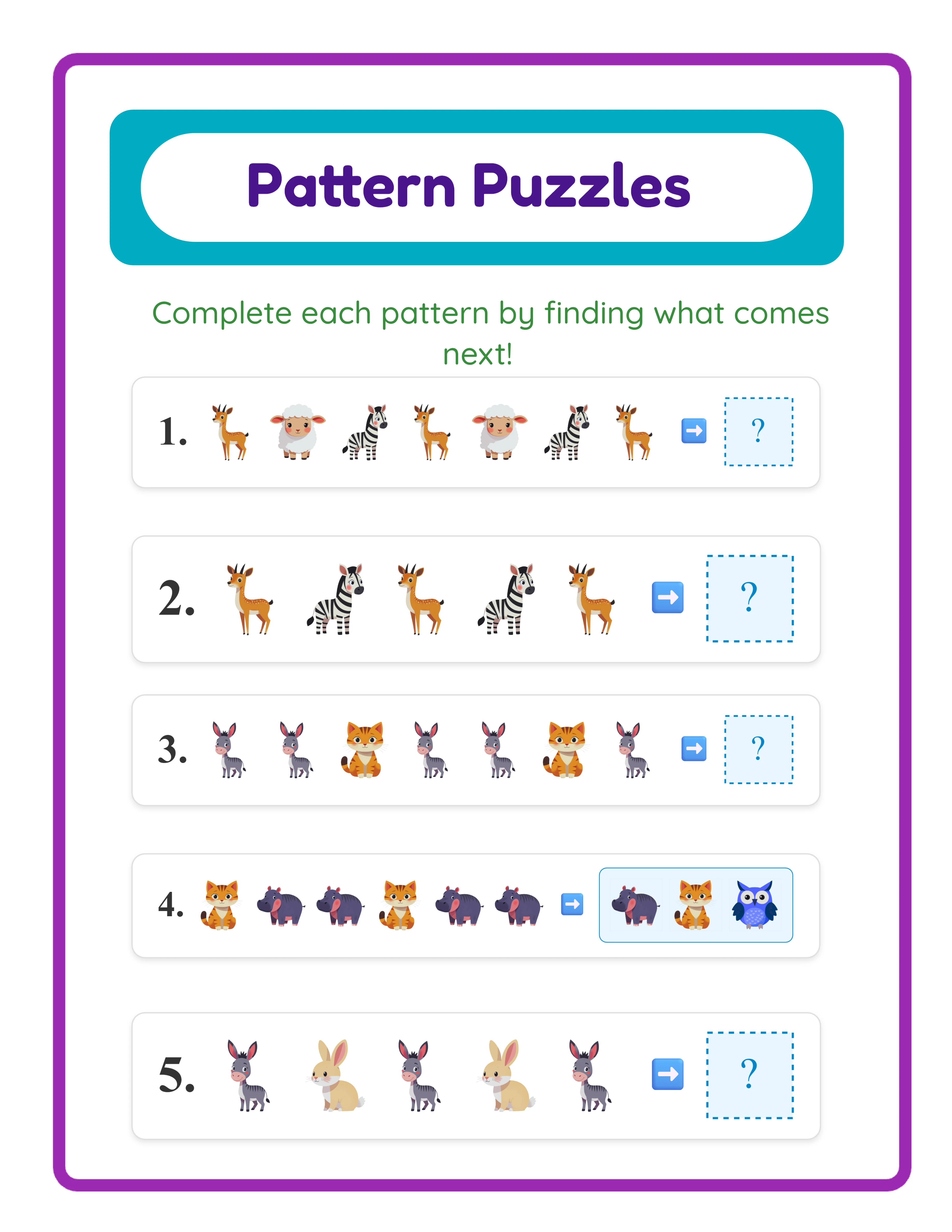
AB — The simplest repeating pattern. Two images alternate: cat, dog, cat, dog, cat, ?. This is where pattern recognition instruction begins for the youngest learners.
AAB — Two of the first image, then one of the second: cat, cat, dog, cat, cat, ?. Slightly more complex because the repetition unit is longer.
ABB — One of the first image, then two of the second: cat, dog, dog, cat, dog, ?. Tests whether children can identify patterns that do not start with the repeated element.
AABB — Two of each image in sequence: cat, cat, dog, dog, cat, cat, ?. The longest 2-image pattern with a 4-element repeating unit.
3-image patterns (pre-K to kindergarten, ages 4–6):
ABC — Three unique images cycle in order: cat, dog, fish, cat, dog, ?. Introduces a third element, requiring children to track more information.
ABBC — The middle image repeats: cat, dog, dog, fish, cat, dog, ?. Combines repetition with three distinct images.
AABC — The first image repeats: cat, cat, dog, fish, cat, cat, ?. Similar complexity to ABBC but with leading repetition.
ABCC — The last image repeats: cat, dog, fish, fish, cat, dog, ?. Trailing repetition changes the visual rhythm.
4-image pattern (kindergarten and above, ages 5+):
ABCD — Four unique images cycle: cat, dog, fish, bird, cat, dog, ?. The most complex pattern type, requiring children to track four distinct elements.
Select your pattern type from the Pattern Type dropdown in the configuration panel. For product creation, target specific age groups by choosing pattern complexity that matches their developmental level. A preschool product uses AB and AAB patterns. A kindergarten product uses ABC and ABCD patterns.
2
Select a Theme from the Image Library
Themed pattern worksheets consistently outsell generic abstract-shape worksheets on every marketplace. Parents and buyers actively search for terms like "animal pattern worksheets" or "dinosaur pattern activities" because themed visuals make learning more engaging for children.
The Pattern Worksheet Maker includes a searchable image library organized by category. With a commercial license, you get access to themed image sets. The Full Access license unlocks over 100 themed image sets covering animals, food, vehicles, nature, holidays, occupations, sports, and dozens more categories.
Use the theme selector or search field to browse available themes. Once selected, the generator uses images from that theme for the pattern exercises. A "farm animals" theme creates patterns using cows, pigs, chickens, and horses. A "sea creatures" theme uses fish, octopus, starfish, and whale.
A unique feature of the Pattern Worksheet Maker is per-puzzle theme assignment. Each exercise on the page can use a different theme. Puzzle 1 might show an AB pattern of farm animals while puzzle 2 shows an ABC pattern of vehicles on the same page. This creates visually varied worksheets that hold children's attention longer.
Alternatively, apply a single theme to all puzzles on the page for a cohesive product identity. A "Dinosaur Pattern Practice" worksheet with all-dinosaur exercises makes a more targeted product for specific search terms.
Theme selection is a strategic product decision. Each theme creates a distinct product you can list separately. Ten themes at the same difficulty level give you ten unique products from the same generator session.
3
Choose the Question Format
The Pattern Worksheet Maker offers two question formats that serve different assessment approaches. This choice defines how children interact with the worksheet and determines which buyer audience your product targets.
Blank Box format presents the pattern sequence with one image replaced by an empty box. Children must identify the missing image and draw it, write its name, or place a sticker. This is an open-ended response format that tests deeper understanding — children cannot guess from options. It works well for group assessment, homeschool practice, and products targeting parents who want their children to think independently.
Choose from Options format presents the pattern sequence with a missing image, plus a row of image choices below (including distractors). Children select the correct image from the options. This is a multiple-choice format that provides scaffolding for younger children or those still developing pattern recognition skills. It works well for introduction-to-patterns activities, standardized test prep, and products targeting buyers who need quick-grading worksheets.
Select your question format from the Question Format dropdown. For product creation, consider making separate products for each format at the same difficulty level. A "Pattern Worksheets — Fill in the Blank" product and a "Pattern Worksheets — Multiple Choice" product serve different buyer needs and capture different search queries.
You can also bundle both formats together. A "Complete Pattern Practice Pack" that includes both blank-box and multiple-choice versions of the same patterns gives buyers versatile materials at a higher price point.
4
Set the Number of Exercises and Layout
The number of exercises per page and the page layout directly affect usability for different age groups. The Pattern Worksheet Maker lets you configure 1 to 8 pattern exercises per page.
Fewer exercises per page (1–3) produce larger images and more white space. This works best for preschool and pre-K children who need large visuals and room to draw or point. Worksheets with 2–3 large exercises per page look premium and feel age-appropriate for the younger audience.
More exercises per page (5–8) pack more practice into each sheet. This works well for kindergarten and first grade children who can handle smaller images and denser layouts. Worksheets with 6–8 exercises are efficient for structured use where buyers need maximum practice from minimum pages.
The default of 5 exercises per page is a balanced middle ground that works across most age groups.
Page size options include US Letter Portrait, US Letter Landscape, A4 Portrait, A4 Landscape, Square, and Custom dimensions. US Letter is standard for North American buyers. A4 is standard for European and international markets. Creating both versions doubles your market reach with minimal additional effort.
Puzzle numbering can be toggled on or off. Numbered exercises make worksheets easier for sellers to reference during instruction ("Look at puzzle number 3") and for parents to track progress. Keep numbering enabled for most products.
The combination of exercise count, page size, and pattern type creates distinct products. A preschool product might use 3 AB-pattern exercises on US Letter Portrait. A kindergarten product might use 6 ABC-pattern exercises on A4 Portrait.
5
Configure Randomization Options
Randomization is what separates professional pattern worksheets from amateur ones. The Pattern Worksheet Maker offers two randomization controls that dramatically improve product quality and variety.
Random Blank Position: When enabled, the missing image can appear anywhere in the pattern sequence — at the beginning, middle, or end. When disabled, the blank always appears at the end of the sequence (the traditional "what comes next?" format). Enabling random blank position is important for two reasons. First, it prevents children from developing a shortcut strategy of only looking at the last element. Second, it creates more challenging exercises because finding a missing element in the middle of a sequence requires understanding the full pattern structure, not just predicting the next item.
Random Start Element: When enabled, the pattern can begin from any element in the sequence rather than always starting with the A element. An AB pattern might start with B: dog, cat, dog, cat, ?. This creates visual variety from the same pattern type and prevents worksheets from looking repetitive.
Both randomization options are checkbox toggles in the configuration panel. For product creation, enable both randomization options for most products. This produces worksheets that look different from each other even when using the same pattern type and theme, which is essential when creating bundles of 10–20 worksheets.
The combination of 9 pattern types, per-puzzle theme assignment, and dual randomization means the generator produces enormous variety from the same configuration. A single theme with one pattern type can generate dozens of visually unique exercises.
6
Customize with Text, Background, and Border Themes
Professional-looking worksheets sell better than plain ones. The Pattern Worksheet Maker includes text tools, background themes, and border themes to elevate your products above generic worksheet offerings.
Text Tools let you add custom titles, instructions, and branding anywhere on the canvas. Common additions include:
A title like "Pattern Practice — What Comes Next?" or "Complete the Pattern" at the top of the page.
Instructions like "Look at the pattern. Draw the missing picture in the empty box." for blank-box format worksheets.
A footer with your brand name or shop URL for recognition across multiple products.
The text editor offers 7 font families (Lexend Deca, Baloo 2, Nunito, Quicksand, Fredoka, Arial, Verdana), adjustable size, color, and outline options. Use clear fonts like Fredoka or Baloo 2 for worksheet titles. Use clean fonts like Lexend Deca or Arial for instructions.
Background Themes add subtle decorative backgrounds to the entire page. Opacity controls let you keep backgrounds light enough that they do not interfere with the pattern exercises. A light polka-dot or star background adds visual warmth without distracting from the core content.
Border Themes frame the worksheet with decorative edges. Combined with a matching background at low opacity, borders give worksheets a polished, professionally designed appearance. This visual quality differentiates your products from plain, unformatted worksheets that dominate low-end marketplace listings.
All canvas elements (text, images, decorations) support drag, resize, rotate, layer ordering, lock/unlock, and alignment. The Fabric.js-powered canvas gives you full creative control with undo/redo support.
7
Review the Automatic Answer Key
Every pattern worksheet generated includes an automatic answer key. Click the Answer Key tab next to the Worksheet tab to view it.
The answer key shows the complete pattern with the correct image filled into the blank position. For blank-box format worksheets, the answer key reveals which image should appear in the empty box. For choose-from-options worksheets, the answer key highlights the correct choice from the multiple-choice options.
This automatic answer key is essential for two buyer segments:
Sellers list answer keys for quick grading. Pattern worksheets with multiple exercises take time to verify manually, especially when randomized blank positions mean the missing element is in a different spot on each exercise. An answer key lets buyers grade an entire class set in minutes.
Parents use answer keys to check their child's work. Homeschool parents particularly value answer keys because they may be helping children with multiple subjects and do not have time to solve every exercise themselves.
The answer key is generated automatically based on the pattern logic. You do not need to solve the patterns yourself or verify correctness manually — the generator handles this with complete accuracy.
When creating marketplace products, always include answer keys. On Etsy and Gumroad, "with answer key" is a commonly searched qualifier. Including it in your product title and description improves search visibility. Your listing can state "Includes answer key for every worksheet" as a prominent selling point.
8
Export as Print-Ready PDF and JPEG
The export section provides four download buttons for the complete worksheet package.
Worksheet JPEG: A high-resolution image file suitable for previewing, using as listing thumbnails, or including in digital downloads. JPEG files are universally compatible and easy for buyers to print.
Worksheet PDF: The professional standard for printable products. PDF files maintain exact formatting across all devices and printers. This is the format most marketplace buyers expect for downloadable worksheets.
Answer Key JPEG and Answer Key PDF: Separate files for the answer key in both formats.
The Grayscale toggle converts all images to black and white. This is a valuable product variation for buyers who want ink-saving printable versions. Create both color and grayscale versions of each worksheet to offer more options. List "ink-friendly black and white version included" as a product feature.
For marketplace listings, export both the PDF (as your deliverable product) and a JPEG (for your listing preview images). Buyers want to see exactly what they are purchasing before they buy. Use the JPEG as your primary listing image on Etsy, and include additional JPEG screenshots showing different exercises, the answer key, and close-up details.
Important: the free trial with watermark produces fully functional exports with a visible watermark overlay. This lets you evaluate print quality, verify formatting, and create test prints before purchasing a commercial license. The commercial license removes the watermark from all exports, producing clean files ready for sale.
.webp)

.webp)
.webp)